

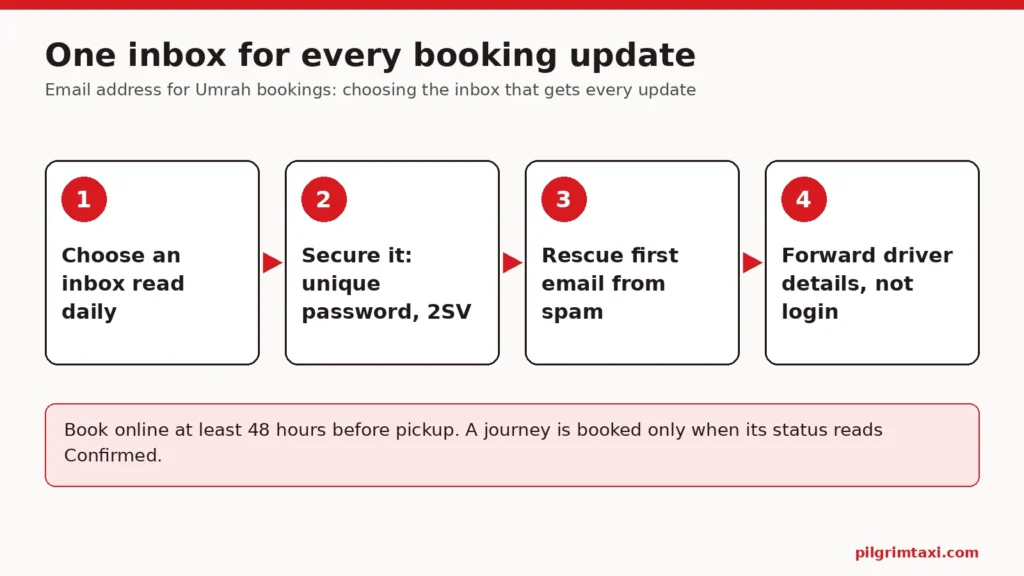
The best email address for Umrah bookings is one that the person managing the transport reads every day, can open on the phone they will carry, and controls securely. On Pilgrim Taxi, the account email receives the payment receipt, the booking confirmation, any acknowledgement of a cancellation request and the driver-assigned email with the vehicle registration and meeting instructions. If those messages land in an inbox nobody checks, or in a spam folder, the family can miss the one detail they need on arrival day.
This guide is for the organiser booking transport for parents or relatives, and for families deciding whether to use a personal, shared or dedicated address. It explains which messages arrive and when, how the email differs from the phone numbers the driver uses, how to stop booking emails going to spam or junk, how to keep the inbox secure, and what to do if the wrong address was used. There is a decision table, a worked example and a checklist.
What arrives at the email address for Umrah bookings
Before choosing an address, it helps to know what it will receive. The emails the system sends include:
- A payment receipt. Sent after checkout. It states that a receipt is not the same as driver acceptance and asks you to wait for the separate booking confirmation.
- A booking confirmation. Sent when the booking team has accepted the journey and the status reads Confirmed.
- A cancellation-request acknowledgement. Sent if you ask to cancel. It says the booking is not cancelled until an approval notice is issued.
- A driver-assigned email. Sent once a driver is assigned. It gives the vehicle registration, meeting and waiting instructions, and a link to view the vehicle photo securely in the account.
The basket can also email a secure review link, so another person can check a journey before one person pays. That link goes to the address you enter when you send it.
Two of these messages matter on the road, not just at home: the confirmation and the driver-assigned email. Whoever holds the email address for Umrah bookings therefore needs to be able to pass those details on quickly, often while the travellers are already in Saudi Arabia. Our guide to the receipt and the booking confirmation explains what each of the first two proves.
Email, phone and account: three different jobs
Families often assume the email address is also how the driver will reach the travellers. It is not. The booking holds several contacts, and each does a different job.
| Contact | Who it belongs to | What it is used for |
|---|---|---|
| Account email | The person who holds the account, usually the organiser | Receipts, confirmation, request acknowledgements, driver-assigned email, account sign-in |
| Customer mobile | The person booking; required at checkout | Contact about the booking |
| Traveller’s name and phone | The person travelling, when you book for someone else; required | Who the journey is for and how to reach them |
| Emergency contact | Someone reachable if the traveller is not; required when booking for someone else | A fallback |
| Group leader phone | Optional | A lead contact for a group |
So an elderly parent does not need their own email address for the transport to work. What they need is a phone that the driver can call and someone, usually the organiser, who reads the emails and passes on what matters. Our guide to the phone number to give for an Umrah pickup covers the phone side in detail.
Personal, shared or dedicated: which address to use
There are three common choices. None is wrong, but each has a weakness that should be planned for.
| Option | Works well when | Watch out for |
|---|---|---|
| The organiser’s personal address | One person manages everything and checks email daily | That person becoming unavailable during the trip |
| A shared family inbox | Two or three relatives genuinely share the work | Everyone assuming someone else has read the message |
| A new address just for the trip | You want travel messages kept apart from daily email | Forgetting to check it, and weak security on a new account |
The organiser’s personal address
This is usually the simplest answer. The organiser already checks the inbox, already has it on their phone, and already has security set up. The risk is dependency on one person: if they fall ill or are travelling themselves, nobody else sees the driver-assigned email. Plan a second person who can be sent the key details, rather than a second person who knows the password.
Shared family email for travel
A shared family email for travel can work when two siblings split the job, one in the UK and one travelling with the parents. It works only with a rule about who acts. Agree that one named person replies to the booking team and one named person forwards the driver details to the travellers. Without that rule, a shared inbox produces two replies to the same question, or none.
Sharing an inbox also means sharing its password, so it must be a separate account used only for travel, never someone’s main personal email.
A dedicated trip address
A new address created for the trip keeps booking messages together and easy to find. The drawbacks are that nobody is in the habit of opening it, and that new accounts are often set up with weak passwords. If you choose this route, add it to the email app on the organiser’s phone so new messages appear alongside everything else, and secure it as carefully as a main account.
Keep the inbox secure
Whichever email address for Umrah bookings you choose, it holds booking references, travellers’ names, pickup times and a link into your account. It deserves proper protection.
The UK’s National Cyber Security Centre advises people to use a strong and separate password for your email, because a criminal with access to your email can reset the passwords of your other accounts and send messages pretending to be you. It also describes turning on two-step verification as one of the most effective ways to protect online accounts.
For a family booking Umrah transport, that translates into four habits:
- Use a password for the email account that is not used anywhere else.
- Turn on two-step verification for that email account.
- Do not post the email password or the booking account password in a family group chat.
- Share journey details, not log-in details, with relatives who need them.
Our guide to what to share when booking and what to keep private goes further on documents and personal data.
Booking emails in spam or junk: stop it before the trip
Booking emails in spam are a common reason families believe they have received nothing. Mail providers filter automatically, and a first message from a new sender is more likely to be caught. The fix takes a few minutes, but it is far better done before the flight than in the arrivals hall.
If you use Gmail
Google’s help page on reporting spam in Gmail explains that you can open the spam folder and select Not spam, after which future emails from that sender will not go to spam. It also says that adding the sender to Google Contacts stops Gmail sending their messages to spam, and that a filter can label a specific sender’s messages. It warns that if you have blocked a sender, Gmail continues to treat their emails as spam even when you remove them from the spam folder.
If you use Outlook
Microsoft’s page on mail going to the Junk folder by mistake advises opening the Junk Email folder, selecting It’s not junk on the messages you want, checking the blocked senders list, and adding the sender to your Safe senders list. It also notes that messages in the Junk folder are deleted automatically between 10 and 30 days after they arrive, so an old confirmation left there may simply disappear.
Other providers
Other mail services have similar tools. Whatever you use, the principle is the same: find the first message from us, mark it as wanted, and add the sender to your contacts or safe list.
A simple test
When you create your account, look for the first email from the site in your inbox. If it is not there, check spam or junk straight away. Pilgrim Taxi has a step to verify your email, and that early message is a useful test of whether later ones will arrive. Fix the filtering then, while nothing urgent depends on it.
Before you pay: check the address you are using
Autofill is a quiet cause of problems. A browser may offer an old work address, a partner’s address, or a misspelt version typed years ago. Before checkout:
- read the email address letter by letter, especially around dots and numbers;
- check that it is the address you will be able to open while the family is travelling;
- make sure it is not a work address that you lose access to on leave, or one filtered by an employer’s system.
If you are using the basket’s review link so a sibling can check the journey first, send it to their address, not yours. The review link is for checking; only one person pays.
If the wrong address was used
If you notice after booking that the account uses an address you cannot read, or one that belongs to someone else, correct it in the account rather than making a new booking. A second booking to get emails elsewhere creates a duplicate, and customer cancellations are subject to our cancellation terms (free cancellation with a full refund up to 48 hours before pickup; inside 48 hours the deposit element of the price is kept), so cancelling one of them can incur a charge assessed under that rule.
Changing the email is done in your account settings, and you will need the current password to do it. That means the account holder should make the change. Once it is done, messages from then on go to the new address. Anything already sent will still be in the old inbox, so recover what you can from it, or check the details directly in your account, which shows your bookings, the status timeline, payments, any cash due to the driver and the driver’s name once assigned.
If the booking is for someone else and it is the traveller’s phone or the emergency contact that is wrong, that is a different correction. Contact the booking team with the booking reference and the correct detail, written clearly.
Getting the details from the inbox to the travellers
An email sitting in the organiser’s inbox in Birmingham does not help a parent standing outside a terminal in Jeddah. The last part of any email plan is how the useful details leave the inbox and reach the people on the road.
Three practical rules help:
- Send a short summary, not the whole email. The travellers need the pickup date and time, the pickup place, the vehicle registration once assigned, and the meeting instructions. A forwarded chain of receipts and account links is harder to read and may include a link into your account.
- Send it once, in one place. A single pinned message in a small travel chat is easier to find than several forwards. Our guide to one final message for the family group chat includes a template.
- Make sure it opens without a signal. Arrival is exactly when phones are switching networks. Save the summary as a screenshot or print it. Our guide to keeping Umrah travel details offline explains which formats work in flight mode.
Timing matters as well. The driver-assigned email often arrives closer to the day than the confirmation, so tell the travellers to expect one more message with the registration, and check the inbox for it rather than waiting to be told.
When the organiser is also travelling
Sometimes the person who booked is on the same flight. In that case, choose an email address for Umrah bookings that works on the phone they will carry, check that mobile data or roaming will let them receive it, and give a second relative at home the booking references so someone can check the account if the traveller’s phone is unavailable. The second relative does not need the password to be useful; they need the references and the booking team’s contact route.
When a different relative takes over
Plans change. The organiser may be travelling, unwell or simply busy, and a brother or cousin takes over for the final weeks. Do not hand over the email password to make this happen. Instead:
- keep the account and its email with the original holder, who forwards the confirmation and the driver-assigned email;
- or, if the new organiser will manage everything, have the account holder change the account email to one the new organiser controls, using the account settings;
- tell the booking team who the lead contact is now, if that has changed.
Our note on handing over the planning to another relative covers the rest of a handover.
Messages that ask for more than they should
Families organising pilgrimage travel receive a lot of email, and not all of it is genuine. Be cautious with any message, text or call that asks you to send a card number, a password or copies of passports by email. Instead of replying or clicking a link, sign in to your account directly through the site and check the booking there. The account is where the real status, payments and requests are shown.
The same care applies to forwarded messages. If a relative forwards “a new link to pay”, check the account before doing anything. A booking already shown as paid does not need a second payment.
Worked example: the Ahmed family’s email plan
Farah Ahmed in Manchester is organising transport for her in-laws, Tariq and Zubaida, who are travelling for Umrah with Farah’s brother-in-law Junaid. They land in Madinah and later move on to Makkah.
The choice. Farah considers a new trip address but decides to use her personal Gmail, which she checks constantly. Junaid, who is travelling, does not get the password.
The test. When Farah registers, the first email lands in spam. She marks it Not spam and adds the sender to her contacts. Every later message arrives in her inbox.
The contacts. At checkout, Farah gives her own mobile as the customer, Tariq’s name and Junaid’s mobile as the traveller’s details, and her husband Sameer as the emergency contact.
The flow. The receipt arrives, then the confirmation for each journey. Farah writes in the family chat: “Madinah Airport pickup booked, Confirmed.” When the driver-assigned email arrives, she sends Junaid the vehicle registration and meeting instructions in one short message, without forwarding the whole email chain.
A change of organiser. A week before departure, Farah learns she must travel for work during the trip. She asks Sameer to take over. Rather than sharing her password, she changes the account email to Sameer’s address in the account settings, using her current password, and tells the booking team that Sameer is now the lead contact at home.
At no point did anyone rely on a spam folder, and the travellers always had the details they needed on their phones.
Checklist: the email address for your Umrah transport
- Choose an address that one named person reads daily and can open on a phone.
- If it is shared, agree who replies and who forwards details to the travellers.
- Secure it: a unique password and two-step verification.
- Test it when you register and rescue the first message from spam or junk.
- Add the sender to your contacts or safe senders list.
- Read the address letter by letter at checkout, ignoring autofill.
- Give the traveller’s phone and an emergency contact that someone will answer.
- Watch for the receipt, then the confirmation, then the driver-assigned email.
- Forward journey details to the travellers, never passwords.
- If the organiser changes, change the account email properly rather than sharing access.
Once the email plan is settled, the booking itself is straightforward. Use the Pilgrim Taxi ride finder to search your journeys, enter the address you have chosen at checkout, and keep an eye on that inbox for the confirmation.
If you cancel, cancellation is free with a full refund up to 48 hours before pickup; inside 48 hours the deposit element of the price is kept, and your statutory rights are unaffected. If we or the transport provider cancel, you receive a full refund for the affected journey.