
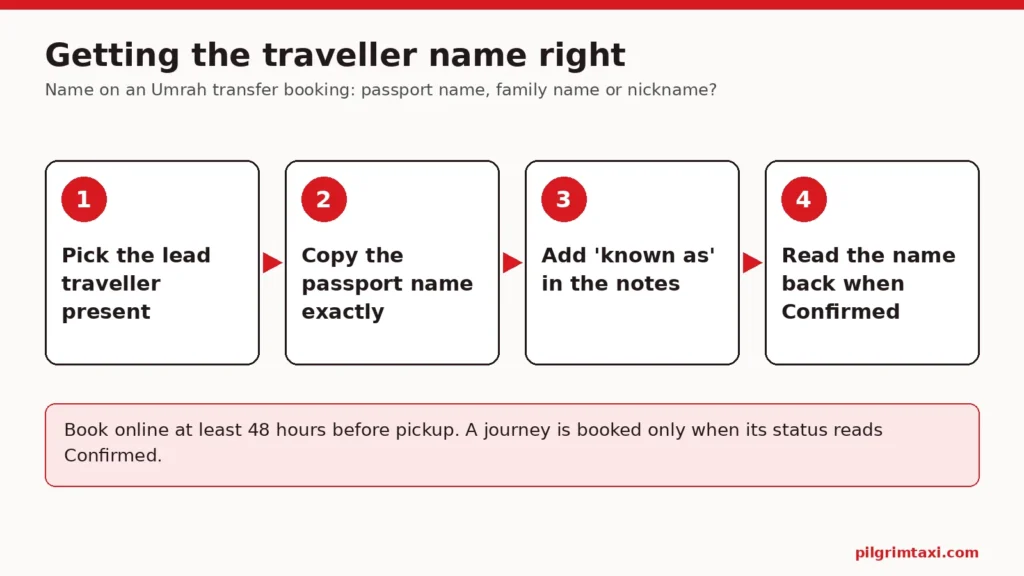
The name on an Umrah transfer booking should be the lead traveller’s name as it is printed on their passport: the person who will actually be in Saudi Arabia to meet the driver, written in the same spelling and order as the travel documents. Not a nickname, not a title such as “Uncle” or “Hajji”, and not the organiser’s own name if the organiser is staying at home. If the traveller answers more readily to another name, add it once in the booking notes as “known as”, but keep the passport name in the traveller field.
This guide is for the family organiser booking for parents or relatives, and for anyone unsure which of a person’s several names to type. It explains why the passport name matters, how the lead traveller name for airport pickup is used on the day, how to handle long names, shared family names and spelling variants, when to add a name in Arabic script, and what to do if a name is wrong after booking. It includes a table of common name problems, a worked example and a checklist.
Why the passport name is the safe choice
A transfer booking is not an identity document, and nobody is going to inspect a passport at the kerb. So why not use the name the family actually calls someone?
Because everything else in the trip uses the passport name. The UK government’s passport guidance is direct about this: the name on your passport must match the one you use when you book your travel. The Saudi eVisa terms require applicants to give true and accurate information and to arrive at the border using the same passport used to apply. Airline tickets, visa records and hotel reservations all follow the passport.
When the transfer booking uses the same name, three things become easier:
- Matching records. The organiser, the booking team and the hotel can all see that the transfer, the flight and the room belong to the same person.
- Fixing problems. If a flight changes or a pickup needs to be moved, the booking team can connect the new flight details to the right traveller without guessing.
- Handing over. If a different relative takes over the planning, the record makes sense to them without a family explanation.
A nickname is fine inside the family. It becomes a problem when it is the only name on a record that someone outside the family has to use.
There is a quieter benefit too. When the organiser at home calls the booking team about a delayed flight at two in the morning, the fastest way to find the right journey is a booking reference and a name that matches the ticket in front of them. “It’s for my dad, we call him Abba” is not something anyone can search for. A name copied from the passport, with the reference beside it, lets the conversation move straight to the problem.
Passport name vs family nickname: what goes where
The simplest rule is one name per field, with the passport name in the name field and anything else in the notes.
| Where | What to write | Example |
|---|---|---|
| Lead traveller name field | Given name and surname as on passport | Abdul Rahman Qureshi |
| Booking notes, if helpful | “Known as” name, once | Known as Rahman |
| Booking notes | Relationship to organiser, if useful | Father of the account holder |
| Contact number field | A number that works in Saudi Arabia on the day | The traveller’s roaming or local number |
| Nowhere | Titles, pet names, honorifics | “Abba”, “Chacha”, “Hajji Sahib” |
| Nowhere | Passport number, date of birth, scans | Not needed for a transfer |
The question of passport name vs family nickname usually resolves itself once you see it laid out like this. The passport name identifies the person. The “known as” line helps the driver or booking team address them comfortably.
How the lead traveller name for airport pickup is used
On the day, the lead traveller name for airport pickup is how the driver and the traveller find each other. The driver is likely to contact the lead traveller by phone and may ask for them by name. Pilgrim Taxi does not offer meet-and-greet name boards as a product, so the name is spoken, messaged or read out on a phone call rather than held up on a sign.
That makes two things important:
- The traveller must recognise the name. If an elderly father has used his second given name all his life, he may not respond to his first. In that case, keep the passport name in the field and add “known as” in the notes, and tell the traveller what name the driver may use.
- The phone number must belong to the named person. If the lead traveller is Rahman but the contact number is the organiser’s UK mobile, the driver may end up talking to someone who is not at the airport. Our guide to one organiser and one travelling contact explains how to separate the two roles.
For travellers who do not use a smartphone comfortably, the named person might be the companion who does. Our guide to making the airport pickup work for an elderly pilgrim without a smartphone covers that choice.
The organiser’s name is not the traveller’s name
Many bookings are made by a son or daughter at home. The account belongs to the organiser, the payment comes from the organiser’s card, and the confirmation arrives in the organiser’s inbox. None of that makes the organiser the lead traveller.
Keep the roles apart:
- Account holder: the organiser who books, pays and manages requests. Our note on choosing an email the organiser can actually use covers the account side.
- Lead traveller: the person in the vehicle, named as on their passport, with a phone that works in Saudi Arabia.
A common mistake is typing your own name out of habit, or accepting a browser’s autofill, in the traveller details. Check them for each journey before paying.
Long names, name order and spelling variants
Many pilgrims have names that do not fit neatly into “first name” and “surname”.
Several given names
If the passport shows three or four given names, you do not usually need all of them in a transport booking. Use the given names and surname as the person is identified on their passport and flight ticket, in the same order. Consistency with the ticket matters more than completeness.
Name order
Some documents print the surname first. If the form separates given names and surname, follow the passport’s labels rather than the order in which the family says the name.
Spelling variants
Muhammad, Mohammed and Mohamad are the same name to the family and different strings to a computer. Use the spelling printed on the passport, even if the family usually writes it another way. The same goes for names such as Abdul Rahman, Abdulrahman and Abd al-Rahman: copy the passport, including whether it is one word or two.
Married names and changed names
If a traveller’s passport still shows a previous surname, use the passport surname for the booking. The passport is the document the airline and the visa follow.
Family members: shared names, children and infants
Two travellers with the same name
In some families, a grandfather, a father and a son share a name, or two cousins called Fatima are travelling together. A surname alone then identifies nobody.
When two travellers share a name:
- use each person’s full passport name, which often differs in a middle name;
- make only one of them the lead traveller for each journey;
- add a short note if needed, such as “Lead traveller is the older Fatima Begum, travelling with her niece Fatima Begum”;
- give each a distinct phone number in the family plan, so a call reaches the right person.
If two separate journeys are booked for two relatives with the same name, check that each booking has the correct flight number and hotel. Similar names make it easy to copy the wrong details from one booking to another.
Children and infants
Children and infants are counted separately in the search, and you do not need to name every child to book a transfer. The lead traveller should always be an adult who will be present. If a child seat, infant seat or booster is needed, add it in the search, where it is confirmed for the vehicle, rather than relying on a name in the notes to signal it.
Names in Arabic script
Adding a traveller’s name in Arabic script can help when a driver reads Arabic more easily than English. But a wrongly transliterated name is worse than none.
- Use an Arabic spelling only if it comes from the traveller or an official document, such as a document they hold that shows their name in Arabic.
- Do not generate one with a translation app and paste it in as fact. Our guide to using translation apps without losing the detail explains why names and addresses are where apps are least reliable.
- Keep the English passport name as the main record. The Arabic spelling is a helpful addition in the notes, not a replacement.
The same principle applies to hotel names; our note on keeping two languages in one destination record sets out how to hold both without creating two versions.
What not to put in the name field
The name field is for a name. Keep out:
- titles and honorifics (“Dr”, “Hajji”, “Sheikh”, “Aunty”), unless they are printed as part of the passport name;
- descriptions (“Mum and Dad”, “the Qureshi family”, “3 ladies”);
- passport numbers, dates of birth or visa numbers;
- instructions (“call on arrival”, “wheelchair”), which belong in the notes or the search options.
A transfer booking needs enough information to identify the person, not a copy of their documents. Our note on asking a useful quote question without oversharing explains how to keep personal information proportionate.
A worked example: two Abdul Rahmans
Zainab, in Birmingham, is booking an arrival transfer from Madinah Airport to the family’s hotel in Madinah for her father and his brother. Both passports show “Abdul Rahman” as the first given name; her father is Abdul Rahman Yusuf Qureshi and her uncle is Abdul Rahman Ismail Qureshi. The family call them “Abba” and “Chacha”.
Step 1: choose the lead traveller. Her father has a phone with roaming enabled and is comfortable answering calls. He is the lead traveller.
Step 2: enter the name. She types “Abdul Rahman Yusuf Qureshi”, exactly as on his passport, not “Abba Qureshi” and not her own name, which her browser had tried to autofill.
Step 3: add a short note. “Lead traveller known as Rahman. Travelling with his brother, also named Abdul Rahman Qureshi. Both answer to Rahman, so please ask for Yusuf’s son if unclear.” She adds her father’s roaming number as the contact.
Step 4: count the party. Two adults, their large bags and cabin bags, entered in the search.
Step 5: read-back. When the booking reads Confirmed, she asks her father to read his name and flight number from the confirmation. Our note on asking for a read-back, not just “yes” explains why a read-back catches more than a yes.
Step 6: brief the travellers. She tells both men that the driver may ask for “Abdul Rahman Qureshi”, and that her father should answer.
Without the note, a driver calling out “Abdul Rahman Qureshi” in arrivals would have had two correct answers. With it, the driver, the booking team and both brothers know exactly who the booking is for, and nobody had to share a passport scan to achieve that.
The name and the flight belong together
For an airport journey, the flight number is requested at checkout. Together, the lead traveller’s passport name and the arriving flight number are how the booking team connects a transfer to a real arrival. If one of them is off, the link weakens.
Enter the flight number exactly as it appears on the airline booking, including the airline code, and make sure it is the flight the named person is actually on. In a family travelling on two different flights, it is easy to put the father’s name against the brother’s flight. Our guide to what to enter as the flight number for an Umrah airport pickup explains the difference between a flight number and a booking reference, which is another common mix-up.
A quick test before paying: read the lead traveller’s name and the flight number aloud together, then find that name on that flight’s e-ticket. If you cannot, one of the two is wrong.
Every journey needs its own name check
Each journey is a separate booking with its own details, so the name on an Umrah transfer booking is checked journey by journey, not once for the whole trip. The lead traveller does not have to be the same person every time.
- Arrival: someone on the arriving flight, present at the airport.
- Hotel to hotel, or an outing: someone in the vehicle for that journey.
- Departure: someone on the departing flight. If the group splits on the way home, each departure journey needs its own lead traveller.
When several journeys are in the basket at once, the basket can email a secure review link so another person can check the details before one person pays. That is a good moment for a relative to confirm that each name is spelled as on the passport and matched to the right journey.
When someone else travels instead
Plans change. A brother drops out and a cousin takes his place, or the lead traveller decides to stay an extra week while the others fly home.
Do not simply tell the replacement to answer to the original name. Contact the booking team with the booking reference and the change. If the number of passengers changes, remember that passenger numbers cannot be changed online; the booking team has to review it, because the vehicle was chosen for the original count.
If the new lead traveller is on a different flight, the flight details change too, and that may make it a different journey altogether rather than an edit.
If the name is wrong after booking
Mistakes happen, often because the organiser typed their own name or an autofilled one. The online requests on a paid booking are for a new pickup time and for cancellation or refund; the name is not one of those. Contact the booking team, give the booking reference and the correct passport name, and keep their reply with the confirmation.
Do not solve the mismatch by telling the traveller to “just answer to my name”. That leaves a record that no longer matches the person, which causes trouble the moment anything else changes.
Do not cancel and rebook to correct a name. Bookings are subject to our cancellation terms (free cancellation with a full refund up to 48 hours before pickup; inside 48 hours the deposit element of the price is kept) if the customer cancels, and a correction is a much smaller request.
Checklist: the name on an Umrah transfer booking
- Decide who the lead traveller is: an adult who will be present, with a phone that works in Saudi Arabia.
- Copy their given names and surname from the passport, in the same spelling and order.
- Check you have not typed your own name, or an autofilled one, instead.
- Add a “known as” name in the notes only if the traveller answers to it more readily.
- Leave out titles, nicknames, descriptions and document numbers.
- Where two travellers share a name, add a short distinguishing note.
- Add an Arabic spelling only from the traveller or an official document.
- Once the booking reads Confirmed, ask the traveller to read their name back from the confirmation.
- Tell the traveller which name the driver may use.
- If the name is wrong, ask the booking team to correct it and keep their reply.
Getting the name on an Umrah transfer booking right takes a minute and saves confusion in a busy arrivals hall. When you have the passport name and the lead traveller’s number to hand, open the Pilgrim Taxi ride finder and start the search for their journey.
If you cancel, cancellation is free with a full refund up to 48 hours before pickup; inside 48 hours the deposit element of the price is kept, and your statutory rights are unaffected. If we or the transport provider cancel, you receive a full refund for the affected journey.