

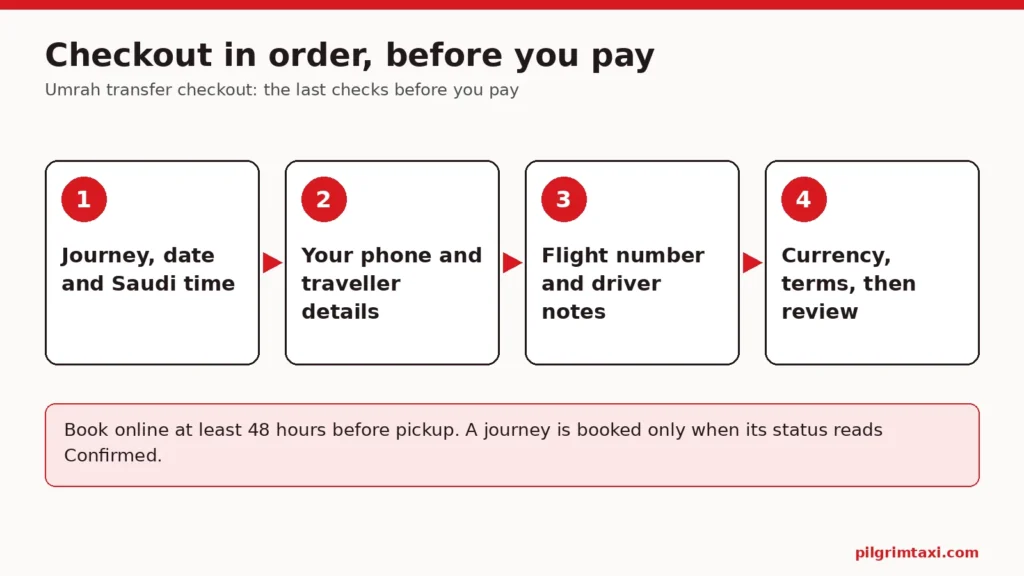
The Umrah transfer checkout is the last point where every detail of a journey can still be changed freely. After payment, only the pickup time can be changed online, so this is the moment to read the journey summary, your own contact details, the traveller’s details if you are booking for someone else, the flight number, the booking notes, the currency and the terms, in that order. A few careful minutes here prevent most of the problems families meet later.
This guide is for the organiser who has searched a journey on Pilgrim Taxi, chosen a vehicle and reached the checkout, often paying for parents or relatives who will travel without them. It walks through what the checkout asks for, what to look for in each part, what to write in the booking notes for the driver, how payment works, and what happens after you pay. It assumes the planning is done; if not, start with our one-page Umrah transport brief first. A worked example and a checklist close the guide.
Why the Umrah transfer checkout matters more than the search
The search is where you explore. You can change dates, add stops, try different passenger counts and compare vehicle classes as often as you like. Nothing is fixed.
The checkout is where the details become a request. Once you pay:
- the pickup place, destination, number of passengers and vehicle cannot be changed online; they need the booking team, or a new booking plus a cancellation request;
- only the pickup time can be changed online, and an approved new time carries a £5 rescheduling fee, converted into the booking currency and added to the cash paid to the driver at pickup;
- the booking is subject to our cancellation terms (free cancellation with a full refund up to 48 hours before pickup; inside 48 hours the deposit element of the price is kept) if you cancel.
If we or the transport partner cancel, or cannot supply the journey and no suitable alternative is accepted, you receive a full refund for the affected journey. That protects you from our side failing. It does not protect you from a wrong detail entered at checkout, which is why the checks below matter.
Step 1: the journey summary
Before any personal details, read the journey itself as if someone else had typed it. Check each line against your own plan or the traveller’s documents, not against memory.
| Item | What to check | Common slip |
|---|---|---|
| Pickup place | The exact airport or hotel, as shown in the route summary | A hotel with a similar name, or the wrong branch |
| Destination | The place the travellers will actually stay or go | The agent’s shortened hotel name resolving elsewhere |
| Stops | Each stop in journey order, up to eight | A stop added in the wrong order |
| Date | The date in Saudi Arabia | An overnight flight booked on the departure date |
| Time | Saudi local time (UTC+3) | The time on the organiser’s phone at home |
| Passengers | Adults, children and infants counted separately | An infant left out, or a child counted as an adult |
| Luggage | Large bags and cabin bags | Cabin bags left at zero |
| Vehicle | The class chosen, shown with an example model “or similar” | Expecting the exact model pictured |
| Requirements | Child seats, wheelchair | A seat needed but not added |
The date and time need special care. The booking uses Saudi local time, and a flight that lands after midnight belongs to the next calendar day. Our guide to getting the pickup date right for an overnight Umrah flight works through the usual traps.
If the hotel is the pickup or the destination, look at the route summary rather than the name alone. Two properties can share a name, and a map pin can sit in the wrong place. The guide to a Makkah hotel address when the name and map pin disagree explains how to settle it before paying.
When to go back to the search
Some problems cannot be fixed at checkout and need a fresh search. Go back if:
- The date or time is wrong. Correct it in the search so the price and vehicle options are worked out for the right journey.
- The passenger or bag count has changed. The search shows only vehicle classes that pass the capacity check for the party and luggage, so a different count may change which vehicles are offered.
- A place was typed rather than chosen from the list. A handful of popular airports and hotels are listed in the planner; any other place is typed and must be checked in the route summary.
- A stop is missing or out of order. Stops belong to the journey and are set in journey order.
- The journey is too close. Online bookings need at least 48 hours’ notice before pickup. A search inside that window returns “This journey must be booked at least 48 hours in advance.” In that case, contact the booking team rather than forcing a later time that does not match the flight.
Going back costs a few minutes. Paying for a journey with the wrong detail costs far more, because after payment most details are no longer yours to change online.
Step 2: your own details
The checkout requires a mobile number for the customer, the person making the booking. In most family bookings this is the organiser’s own number.
Check three things:
- The number is in full international format, with the country code. A number that works when dialled at home may not connect from Saudi Arabia.
- It is a phone you will answer during the trip, including at unusual hours when flights land.
- The browser has not filled in an old number. Autofill is convenient, but it often supplies an out-of-date phone or a different family member’s details.
Step 3: booking for someone else
When the booking is for another person, the checkout asks for more. The traveller’s name, the traveller’s phone and an emergency contact are required. There is also an optional group leader phone field.
These fields decide who the driver can reach on the day, so fill them deliberately.
Traveller’s name. Use the name exactly as on the passport, without titles or nicknames. If several relatives travel, give the person who will lead at the kerb. Our guide to the name on an Umrah transfer booking covers spelling variants and shared names.
Traveller’s phone. This should be a phone that will be switched on and with the traveller in Saudi Arabia. If a parent will not have a working phone on arrival, think carefully about whose number goes here. The guide to which phone number to give for an Umrah pickup sets out the choices, including roaming and local SIMs.
Emergency contact. Someone who can be reached if the traveller cannot, and who knows the plan. It is often the organiser at home, but it does not have to be.
Group leader phone. Useful for a larger family where one relative takes charge on the ground. Leave it empty rather than repeating a number already given.
Step 4: the flight number
For airport journeys, the checkout asks for the flight number. Enter the airline code and number exactly as on the itinerary, for the flight that actually lands at the pickup airport. On a connecting itinerary, that is the final flight into Saudi Arabia, not the first one.
Do not enter the airline booking reference or the ticket number in its place. They look similar on an itinerary but mean different things. Our guide to the flight number for an Umrah airport pickup shows where each code appears.
Step 5: booking notes for the driver
The notes field is where you add what the other fields cannot hold. They can describe entrances, gates and practical needs. Used well, they save phone calls on the day. Used badly, they bury one important fact under several paragraphs.
What to write
- The full hotel name and address as on the hotel confirmation, and the hotel’s Arabic name if the hotel has given it.
- An entrance or meeting place the hotel has recommended, labelled as the hotel’s advice.
- Practical needs: a folding wheelchair, a traveller who walks slowly, help with bags.
- A second contact name and number, if not already in the fields above.
- For a stop, its purpose and who gets in or out.
How to write it
- One fact per line.
- Plain sentences, no abbreviations the driver may not know.
- Times in Saudi local time on the 24-hour clock, with the date.
- Nothing that contradicts the fields above. If the notes say a different time or place from the booking, the booking wins, and the confusion remains.
What to leave out
Passport numbers, visa details, card numbers and full medical histories do not belong in booking notes. Describe a need, not a diagnosis. Our guide to what to tell the driver about reduced mobility gives an example note that says enough without oversharing.
Keep in mind that where a vehicle may stop at a hotel or near the Haram is managed on the day. The notes pass on information; they cannot guarantee a particular entrance. On the day, agree a meeting point with the driver and send a live location if that helps.
Step 6: currency and the price lines
Pilgrim Taxi offers 13 display currencies, including Saudi riyals, pounds sterling, euros and US dollars. The currency you choose is the booking currency, and any later amount, such as a rescheduling fee, is shown in it.
Where you can, choose one currency and keep it for every journey in the trip. When all the bookings share a currency, the family can add up the totals, compare them with a bank statement and understand any later amount in the account without converting between currencies. It also makes splitting the cost between relatives much simpler.
Before paying, look at the price lines, not only the total:
- The currency code. Make sure the total is in the currency you intended. A figure that looks low or high may simply be in a different currency.
- The minimum booking amount line. Each journey has a minimum booking value equivalent to £40. If a fare would be lower, a “Minimum booking amount” line appears. It is not an error.
- What your card provider may do. If you pay in a currency different from your card’s, your card provider may apply its own conversion. Check with them if the exact amount on your statement matters.
Step 7: full payment and the terms
Pilgrim Taxi takes full payment online at checkout. There is no deposit and no balance for the journey price, so for most bookings nothing further is due on the day. The account will show if cash becomes due to the driver later, for example after an approved change of time. The checkout explains that any cash amount is a separate payment made directly to the driver and is not covered by any refund from us.
Read the terms before you tick the box. The points families most often miss are the ones already covered above: customer cancellations subject to our cancellation terms (free cancellation with a full refund up to 48 hours before pickup; inside 48 hours the deposit element of the price is kept), time-only changes online, the £5 rescheduling fee and the 48-hour notice for online bookings. The full wording is in the Saudi Cab Co terms and conditions.
Paying safely
The UK National Cyber Security Centre’s guidance on shopping and paying safely online recommends using a credit card where you have one, because many offer protection under the Consumer Credit Act, and not letting your browser remember your payment details. It also advises never paying by direct bank transfer. Pay through the checkout itself, and treat any message asking you to pay another way with suspicion.
Checks before you pay for a transfer: one more pair of eyes
The basket can email a secure review link so another person can check the journey before one person pays. This is the best of all checks before you pay for a transfer, because the reviewer reads the details fresh.
Choose a reviewer who knows the travellers’ plans: the relative who holds the flight itinerary, or the traveller themselves if they are comfortable reading it. Ask them to check the date, time, pickup, destination and passenger count against their own documents, not just to say it looks fine. Then only one person pays. Two relatives paying for the same journey from two devices is how duplicate bookings happen.
What happens after you pay
Payment secures a provisional request. The booking team checks the journey and updates the status, normally within 1 to 12 hours. The journey is booked only when it reads Confirmed.
You will first receive a payment receipt, which is not the same as driver acceptance, followed later by a separate booking confirmation. When a driver is assigned, a further email gives the vehicle registration and meeting instructions, with a link to view the vehicle photo securely in the account. Our guide to what an Umrah transport receipt and booking confirmation each prove explains which record answers which question.
If something at checkout was wrong and you only notice after paying, act at once. Use “Request a new pickup time” if only the time is wrong. For anything else, write to the booking team with the booking reference and the correct detail before the day.
Worked example: Aisha pays for her parents’ arrival
Aisha lives in Manchester. Her parents, Abdul Hamid and Rashida, are flying to Jeddah and staying at a hotel in Makkah. Aisha has searched the journey from King Abdulaziz International Airport to the hotel and chosen a Business & Executive car for two adults, two large cases and two cabin bags.
At checkout she works through each step.
- Journey summary. The date shows Thursday. She checks the itinerary: the flight lands at 00:40 Saudi time on Friday. She goes back, corrects the date to Friday and reruns the search.
- Her details. The browser has filled in her old work mobile. She replaces it with her personal number in full international format.
- Traveller details. She enters her father as the traveller, with his passport spelling, and his mobile, which will have a roaming service. She adds her brother, who lives in Jeddah, as the emergency contact.
- Flight number. The itinerary has two flights. She enters the second, the one that lands in Jeddah.
- Booking notes. She writes three lines: the hotel’s full name and the Arabic name from its confirmation; “Mother walks slowly, please allow time at the car”; her brother’s number as a second contact.
- Currency. The total is in pounds, as she intended.
- Review. She emails the secure review link to her brother. He spots that the notes use the travel agent’s shortened hotel name rather than the full name on the hotel’s confirmation. Aisha copies the full name into the note.
She pays, receives the receipt and tells her parents that the transfer is requested, not yet booked. The next morning the status reads Confirmed, and she sends them one message with the date, time and hotel.
Umrah transfer checkout checklist
- Read the journey summary against the traveller’s documents: pickup, destination, stops, date, Saudi local time.
- Check adults, children and infants separately, and both large bags and cabin bags.
- Confirm child seats or a wheelchair requirement if needed.
- Replace any autofilled phone number with the correct one in full international format.
- If booking for someone else, enter the traveller’s passport name, a phone they will carry, and an emergency contact.
- Enter the flight number of the final flight into the pickup airport.
- Write short booking notes for the driver: address, practical needs, second contact; nothing sensitive.
- Check the currency code and look for the “Minimum booking amount” line.
- Read the terms: customer cancellations subject to our cancellation terms (free cancellation with a full refund up to 48 hours before pickup; inside 48 hours the deposit element of the price is kept), time-only online changes, the £5 rescheduling fee.
- Send the secure review link to one relative who knows the plan, then let one person pay.
- After paying, wait for Confirmed before telling the travellers the journey is booked.
When everything is ready, start from the Pilgrim Taxi ride finder, search at least 48 hours before pickup, and give the Umrah transfer checkout the same care as the flight booking.